Showing posts with label Concept Development for Digital Application. Show all posts

Monday, 14 March 2016

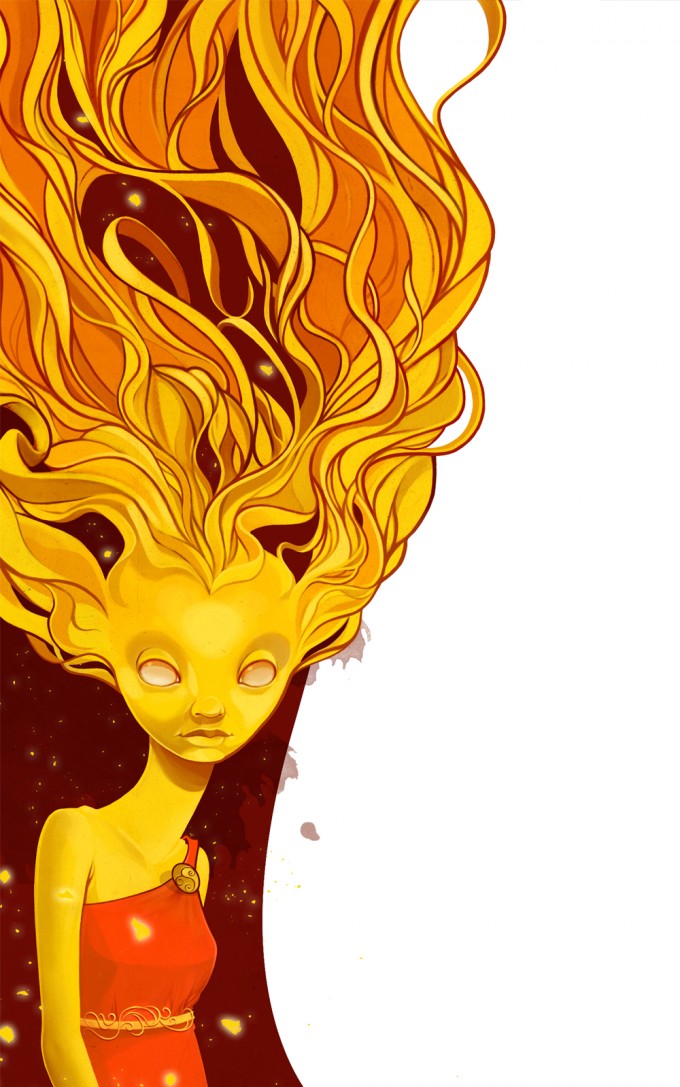
Concept Art Research - Vanja Todoric


14/03/2016
Charlotte Bethany Henderson
100359031

Vanja Todoric Artist Research

I really like the stylized way that this artist works in, as I feel like it helps to portray his characters even better than if they had been drawn realistically. It gives them an extra charm. I also like his use of colour in his work.


Concept Art Research - Studio Qube


14/03/2016
Charlotte Bethany Henderson
100359031

Studio Qube Artist Research

Two artists work at Studio Qube, Michael Chomicki and Cyprian Chomick, and work on everything from illustration to concept art.

I really like the work that is produced from this studio, because its very clean and simple. A lot of their work is robotic, or of armoured characters, so this works well for them, as otherwise i'm sure it would get very complicated.  It's all very creative, and unusual, and I have never seen a piece of work from them that hasn't interested and surprised me in some way. I love their use of colour in the more 'tribal' designs, and will probably end up taking some inspiration from these in my final character sheet.


Wednesday, 9 March 2016

Monday, 7 March 2016

Week 8 - Photo-manipulation


07/03/2016
Charlotte Bethany Henderson
100359031

Week 8 - Photo-manipulation


I used two images that i sorted online to merge together to form an image I could use in a paint over for my environment concept work.
I placed the image of the tree house in the centre of the other image of the forest, as it is the most important part of the concept piece, as this will be my characters base of operations, I removed a lot of the image around the outside of the treehouse, because I didn't want it included in the final image. I then used the colour match to adjust the overlaying image to match the colouring on the base forest image.

Thursday, 3 March 2016

Monday, 29 February 2016

Week Seven - Character Proportions


29/02/2016
Charlotte Bethany Henderson
100359031

Week 7 - Character Proportions


Looking at the proportions of this character 'Batman' (I'm not sure which game this comes from exactly), he has a typical superhero build, a large upper body, and thinner, less exaggerated legs. The main width in this character comes from the shoulders, which gives him a very dramatic silhouette, and insinuate that he is, obviously, very strong etc. The artist has not really altered typical proportions vertically, his torso, arms and legs all have a fairly realistic proportion in length, his legs may be slightly longer than usual, and the torso slightly shorter, but not in an overly dramatic way. I feel that the width of his shoulders is nicely balanced by the cloak he wears, otherwise I feel he may come across as being too top heavy perhaps?

Thursday, 25 February 2016

Wednesday, 17 February 2016

Monday, 15 February 2016

Week five - Perspective


15/02/2016
Charlotte Bethany Henderson
100359031

Week 5 - Perspective

We were given several images to chose to create a perspective grid for on Photoshop. The simplest way to explain how to create a perspective grid is to find lines that already exist in the photo, and follow them to their vanishing point. I did several examples of this, with different kinds of perspective to get the most practice from the task.


Wednesday, 10 February 2016

Life drawing week 4


10/02/2016
Charlotte Bethany Henderson
100359031

Images from week 4 of Life Drawing

(I missed the lecture in week 3)


This week we had a model who dressed up in LARP gear for us, so we could focus on drawing materials, the creases and folds in the fabric, which I very much enjoyed, as I think it's easier to find a flow to draw from. I feel like I'm slowly improving with how much work I complete for each drawing, as though they aren't completely finished, they are far more detailed than my past work has been.

Monday, 8 February 2016

Week Four - Silhouettes


8/02/2016
Charlotte Bethany Henderson
100359031

Week 4 - Weapon Silhouettes

We began working using basic silhouettes, this is a really good way to get ideas down quickly, and see if they have the impact you want them to, without having to add loads of detail. They can then be worked over, allowing you to only persue ideas that you like, preventing time waste.


My favourite of these three silhouettes was the bottom knife like weapon, (Highlighted with blue). I felt like this had the nicest flow out of the three, and also I felt like I could end up using this as the basis for my final weapon concept. It developed into a stone blade, making it look more like an ancient artifact.


Monday, 1 February 2016

Week 3 - Environment Design


01/02/2016
Charlotte Bethany Henderson
100359031

Week 3 - Environment Design (No Lecture)

This week there was no lecture, but we were set a sessional task, to create a paintover from one of the images given to us.

Mine is shown below.

Original Image


Foreground Paintover


I used several layers to create the paintover, each layer in a different shade of grey, and collected all of these into a layer folder.
As most of the area is light, I filled in the areas of dark first to get the details, before blocking in the rest with the lightest colour that I chose to use.

Midground Paintover


I repeated this technique with the midground, keeping all the layers together in a folder again, with this folder beneath the foreground folder, as all of this would need to be behind the foreground.

Final Image


Wednesday, 27 January 2016

Life Drawing week 2


27/01/2016
Charlotte Bethany Henderson
100359031

Images from week 2 of Life Drawing.


This week we didn't have a life model, so we spent the session drawing portraits of each other. Once again, I need to work more on getting in detail, as none of these really contain much more than face shape, and shading. I need to spend more time working on getting features sketched in, so that they are useful in future to work from.

Monday, 25 January 2016

Week two - Character Concept


25/01/2016
Charlotte Bethany Henderson
100359031

Week two - Using Colour

This week we looked at character concept art, and the considerations that go into them. This included looking at character expression sheets, as well as using the characters background and attributes as a basis for how they might look. Will the way they dress or the way they look affect their animation?

The sessional task was to add colour to an image that we were given to a completed concept piece.
My attempt at this is shown in stages below.

Original Image


Adding Basic Colour

To start with I added basic colour to the image, I felt that the green and brown worked well together, as a sort of 'forest' themed costume for the character. I also chose to give him a lighter green skin as I wanted to keep the colour palette fairly limited, otherwise I thought there would be too much going on within the image.
As a final touch, I chose to colour his amulet a bright red, as this is a contrasting colour to the green, which really makes it stand out.


Next to the image I was working on I kept a small colour palette that I was working with, so that colours could easily be reselected, as well as in order to keep track of how many colours I was using. In hindsight I should have kept this on a separate layer, rather than adding it onto the corner of each layer I worked on.


Shading and Details

Adding shading onto the character makes it look a lot more 3 dimensional, rather than a flat drawing, it helps to get across more details in the character, and generally just looks a bit better.
On this image it also helps to cover up the underlying outlines of the image, making it look neater.


It has also helped to create depth within the image, showing that the across body straps, sit on top of the shirt, rather than being on the same level as it.


Finished Image